
How to wire security cameras is one of the most essential steps in building a reliable, high-performance surveillance system. At Cam Security Surveillance, we understand that the quality of your camera’s video feed is only as strong as the wiring behind it. Whether you’re securing a residential property or a commercial space, proper wiring ensures uninterrupted footage, clearer images, and long-term system reliability.
While wireless cameras offer convenience, they often fall short in areas where signal interference, power dependency, or bandwidth limitations come into play. Wired security camera systems, on the other hand, offer greater stability, consistent video transmission, and enhanced security making them the preferred choice for serious surveillance needs. In this guide, we’ll walk you through everything you need to know to wire your cameras correctly and effectively.
Tools and Materials Needed to Wire Security Cameras
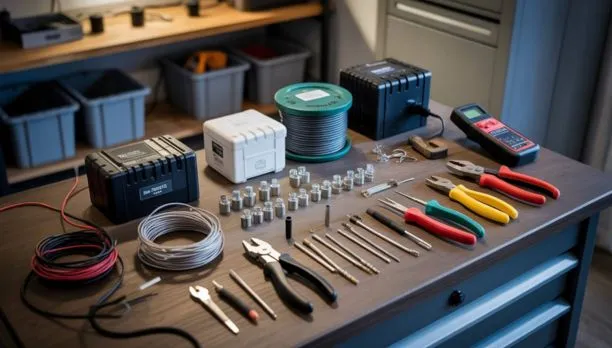
If you’re learning how to wire security cameras, having the right tools upfront will make the job easier and more reliable. At Cam Security Surveillance, we recommend using high-quality materials especially if you want to connect security cameras to phones and keep your footage clear in all conditions.
- Drill and bits for mounting and cable holes
- Fish tape to guide cables through tight spaces
- Ethernet or coaxial cables depending on system type
- Power adapters or distribution box
- DVR or NVR to record footage
- PoE switch for powering IP cameras
- Cable clips and conduits for neat installation
- Weatherproof boxes to protect outdoor wiring
- Anti-fog inserts to prevent fog on lenses
- Screwdrivers, strippers, crimpers, and a level
Using these tools makes installing security cameras cleaner and more efficient. And if you need help, Cam Security Surveillance is here to get it done right.
Understanding Different Wiring Types for Security Cameras
When learning how to wire security cameras, it’s important to understand the different wiring types available. Choosing the right security camera wire directly affects video quality, system compatibility, power delivery, and installation complexity. Whether you’re using analog CCTV or IP-based systems, knowing your options helps ensure a smooth and reliable setup.
- BNC with Coaxial Cables – Commonly used for analog CCTV systems and compatible with DVRs
Siamese Cable Setups – Combines coaxial video with a separate power line in one cable - PoE (Power over Ethernet) – Powers IP cameras and transmits video/data over a single Ethernet cable
- ePoE (Extended Power over Ethernet) – Allows for longer-distance cabling with fewer connection points
Each wiring type serves different purposes, and the best choice depends on your camera system and building layout. For example, PoE is ideal for simplified IP camera installations, while BNC and Siamese cables remain reliable for legacy systems still compatible with DVRs. Advanced users or large properties might prefer ePoE for extended cable runs without signal loss. Understanding these wiring types will help you make smarter decisions when figuring out how to wire security cameras properly from the start.
Step-by-Step Guide: How to Wire Security Cameras
If you’re trying to figure out how to wire security cameras the right way, following a step-by-step process can save time and reduce costly mistakes. Whether you’re a DIY homeowner or working with professional surveillance system installers, proper planning and clean execution make a big difference especially for those doing a full house security camera installation with multiple wired cameras.
Step 1: Plan Camera Locations and Cable Paths
Walk around your property and choose spots that give you full coverage of key areas like entry points, driveways, and backyards. Also, map out the shortest and safest routes for cables, keeping in mind how to hide camera wires for a cleaner look.
Step 2: Drill Holes and Mount Cameras
Use a power drill to create openings for cables. Secure your cameras to walls or ceilings using screws, ensuring they’re leveled and angled correctly.
Step 3: Run Cables Through Walls/Ceilings
Feed the cables from each camera through attics, basements, or conduit piping. This step is crucial in protecting your wired cameras and preventing visible clutter.
Step 4: Connect to DVR/NVR and Power Source
Plug the video cable into your DVR or NVR, and connect the power supply to each camera. If you’re using PoE, a single Ethernet cable will handle both tasks.
Step 5: Configure System and Test Feeds
Turn on your system, check each feed for clarity, and fine-tune angles as needed. Make sure all connections are secure and that remote viewing works if available.
Common Mistakes to Avoid When Wiring Security Cameras
Learning how to wire security cameras involves more than just running cables and powering up devices. Overlooking small but critical steps can lead to poor performance, video failure, or even safety risks. Whether you’re learning the basics of installing or upgrading an existing system, avoiding these common errors is key to getting a clean, stable setup.
- Using low-quality or unshielded cables that degrade video signal
- Running cables too long without boosters, leading to feed drops
- Skipping grounding, which can cause electrical interference or damage
- Placing cables near high-voltage lines, which creates signal noise
- Forgetting to weatherproof outdoor connections, especially in wet areas
- Failing to hide security cameras or wires, making them easy to tamper with
- Overloading power supplies, which may result in video loss reasons later
- Ignoring compatibility between DVR/NVR and camera signal type
When you understand the basics of installing a wired system correctly, you’ll reduce maintenance issues and keep your footage dependable. If you want a smooth experience without worrying about video loss reasons, take time to install properly or consult experts who know how to do it right the first time.
Why Choose Cam Security Surveillance
At Cam Security Surveillance, we specialize in delivering professional-grade solutions for both residential and commercial clients who value safety, quality, and long-term reliability.
Our team understands that a successful home security camera installation goes far beyond mounting devices; it’s about smart wiring, clean cable management, and ensuring your system works flawlessly from day one. We don’t cut corners, and we never compromise on the small details that make a big difference.
With Cam Security Surveillance, you get:
- Expert installers who plan, wire, and optimize every connection
- Systems designed to reduce future maintenance or video signal loss
- Neat installations that hide wires, preserve your property’s look, and boost camera protection
- Complete setup support from planning and wiring to remote viewing setup and testing
If you want a trusted partner that knows exactly how to wire security cameras the right way, choose the professionals who treat your safety like their own. Choose Cam Security Surveillance.
Final Thought
Understanding how to wire security cameras correctly is crucial for ensuring long-term performance, system reliability, and crystal-clear video when it matters most. From planning cable paths to securing clean connections, every step impacts your overall security.
If you want the job done right the first time, trust the experts at Cam Security Surveillance. Our team provides clean, professional installations that are built to last. Contact us today to schedule your security camera wiring and get peace of mind backed by experience.
FAQs
What is the best way to wire security cameras for a home?
The best way to wire security cameras involves planning your camera layout, using high-quality Ethernet or coaxial cables, and protecting outdoor connections. For home setups, Power over Ethernet (PoE) is often preferred for its simplicity and reliability.
Can I wire security cameras myself or should I hire a professional?
You can wire security cameras yourself if you understand basic tools, cable routing, and system setup. However, hiring professionals like Cam Security Surveillance ensures clean installations, secure wiring, and full system functionality especially for larger or multi-camera setups.
How long can security camera wires be without losing signal quality?
Coaxial cables can typically run up to 300 feet, while PoE Ethernet cables (Cat5e/Cat6) work best under 328 feet. For longer runs, use signal boosters or ePoE solutions to maintain video quality and system reliability.










