A camera that stops working at the wrong moment can cost you real evidence. Dust builds up on lenses, cables loosen, and storage drives fill up without anyone noticing. Most system failures start small and grow quiet over months.
So what maintenance does CCTV need? It needs regular lens cleaning, cable checks, firmware updates, and storage reviews. Each task is simple, but skipping them adds up fast.
What Maintenance Does CCTV Need?

CCTV maintenance covers five main areas: cameras, cables, recorders, storage, and software. Each part wears down in its own way, so each needs its own check.
Camera lenses collect dust, spider webs, and water spots. This blurs footage even when the camera still works. Cables loosen from weather changes or get chewed by pests. A loose cable can knock out a camera without warning.
Your DVR or NVR is the brain of the system. It needs airflow, clean storage, and current firmware to work well. Skip these and the whole setup can lag or crash.
Storage drives fill up and wear out over time. Old footage gets overwritten, and full drives stop recording new events. Firmware and app updates patch security holes and fix bugs. An outdated system is easier to hack and more likely to glitch.
This is the short answer to what maintenance does CCTV need. The rest of this guide breaks down each task step by step.
How Often Should CCTV Cameras Be Maintained?
Most homes and small offices need a full check every three months. Busy sites like warehouses or stores should check monthly.
Here’s a simple breakdown:
- Weekly: Glance at live feeds to confirm cameras are online.
- Monthly: Wipe down lenses and test night vision.
- Every 3 months: Check cables, connectors, and mounting brackets.
- Every 6 months: Update firmware and clear old storage files.
- Yearly: Have a professional inspect the full cctv system maintenance setup.
Weather matters too. Cameras near coastlines or in dusty areas need more frequent cleaning than cameras in mild, clean climates.
How to Clean CCTV Camera Lenses
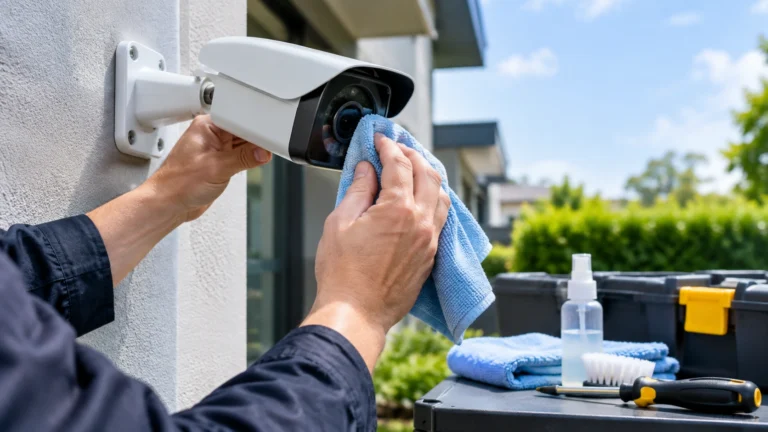
A dirty lens is the most common cause of blurry footage. Cleaning takes less than five minutes per camera.
- Turn off the camera or put it in maintenance mode if your system allows it.
- Use a soft microfiber cloth, never paper towels or rough fabric.
- Spray a small amount of lens cleaner on the cloth, not directly on the lens.
- Wipe in gentle circles from the center outward.
- Check the dome cover too, since scratches and haze build up there as well.
Avoid ammonia-based cleaners. They can damage the coating on some lenses over time. Compressed air works well for loose dust before you wipe with the cloth.
How to Maintain Outdoor CCTV Cameras
Outdoor units face rain, sun, heat, and wind. This makes maintenance of cctv systems outdoors more demanding than indoor setups.
Check the housing seal every few months. A cracked seal lets moisture inside, which fogs the lens or damages internal parts. Look for rust on metal brackets and mounts, especially in coastal areas with salty air.
Trim nearby branches and bushes that block the view or brush against the camera in wind. Spider webs near infrared sensors can trigger false night vision alerts, so clear them during your regular check.
If a camera has a sun shield or hood, confirm it’s still angled correctly. Sun glare can wash out footage during certain hours, and a small adjustment often fixes it.
How to Maintain CCTV Cables and Connections
Loose or damaged cables cause more outages than people expect. This step is often skipped, but it’s one of the easiest parts of cctv camera maintenance.
Walk the visible cable path and look for:
- Cracked or brittle insulation from sun exposure
- Chew marks from rodents or birds
- Loose connectors at the camera or the recorder
- Water pooling near underground or exterior cable runs
Tighten any loose connections by hand. Don’t overtighten, since this can strip the threads. If you find exposed wiring, wrap it with weatherproof tape as a short-term fix, then plan a proper repair soon.
Label your cables if they aren’t already. This saves time during future troubleshooting and makes maintenance of cctv systems much faster for anyone who works on it later.
How to Maintain a DVR or NVR
Your recorder handles constant data flow, so it needs airflow and a clean environment to run well.
Keep the unit in a ventilated spot, away from direct sun and dust. Wipe down the vents every few months with a dry cloth or small brush. Check that the internal fan, if it has one, spins freely without grinding noise.
Restart the DVR or NVR every few months. This clears temporary memory buildup and can fix small lag issues before they turn into bigger problems. Back up important settings before any restart or update, just in case something resets.
How to Check CCTV Recording and Storage
A camera that records nothing is just a decoration. Check your storage regularly to confirm footage is actually saving.
Pull up random clips from different times and days. Confirm the video quality, timestamp accuracy, and audio if your system records sound. Check the drive’s remaining space and set alerts if your system supports them.
Hard drives have a limited lifespan, usually three to five years under constant use. Replace drives before they fail completely, since a dead drive can mean lost footage right when you need it most. This step is a core part of cctv system maintenance that many people overlook until it’s too late.
Why CCTV Firmware and Software Updates Matter
Firmware updates aren’t just for new features. They patch security flaws that hackers actively look for.
Outdated systems are easier targets for unauthorized access. Manufacturers release updates after finding bugs or vulnerabilities, so delaying an update leaves a known gap open. Check your camera brand’s app or website every few months for new firmware.
Back up your current settings before updating anything. Updates occasionally reset configurations, and a backup saves you from starting over. This single habit answers a big part of what maintenance does CCTV need in terms of digital security, not just physical upkeep.
How to Test CCTV Night Vision
Night vision failure usually shows up only after dark, which is the worst time to discover it.
Test each camera after sunset once a month. Look for even lighting across the frame, not just a bright center with dark edges. Check for glare from nearby glass, reflective surfaces, or rain on the lens housing.
If infrared LEDs look dim or uneven, the camera may need cleaning around the sensor ring or a full replacement if the LEDs are worn out. Spider webs and dust near the infrared sensor are a common cause of foggy or washed-out night footage.
When to Call a CCTV Professional
Some tasks are safe for a DIY check, but others need trained hands. Call a professional if you notice recurring signal loss, corroded wiring, or storage failures you can’t explain.
A pro can also test your whole system’s coverage and angles, not just individual cameras. This matters more than people think, since blind spots often go unnoticed for months. If you’re upgrading your setup or starting fresh, look into security camera installation Indianapolis services from a licensed team that understands local weather and building codes.
At Cam Security Surveillance, our technicians handle full system checks, cable repairs, and new installs for homes and businesses. A yearly professional visit catches problems that a routine wipe-down or reboot can’t fix.
CCTV Maintenance Checklist
Use this quick list to stay on track with routine maintenance of cctv systems:
- [ ] Wipe camera lenses and dome covers monthly
- [ ] Check cable connections every three months
- [ ] Inspect outdoor housings for cracks or rust
- [ ] Test night vision after dark once a month
- [ ] Confirm storage drives have space and are recording
- [ ] Update firmware every six months
- [ ] Restart the DVR or NVR periodically
- [ ] Trim branches or objects blocking camera views
- [ ] Schedule a professional inspection once a year
Conclusion
Knowing what maintenance does CCTV need comes down to a few honest habits. Clean the lenses, check the cables, update the firmware, and confirm your storage is working. None of these tasks take long, but skipping them for months can leave you without footage exactly when you need it.
Set a simple schedule and stick to it. Your system will run longer, record clearer footage, and give you fewer surprises down the road. Contact us today for professional CCTV maintenance and reliable security camera solutions.
FAQs
How often should I clean my CCTV cameras?
Wipe lenses monthly, and check the full system every three months for a typical home or office setup.
Can I do CCTV maintenance myself?
Yes, for basic tasks like cleaning lenses and checking cables. Wiring repairs, storage failures, or full coverage testing are better left to a professional.
What happens if I skip CCTV maintenance?
Footage quality drops, cameras may stop recording, and outdated firmware leaves your system open to hacking attempts.
How long do CCTV hard drives last?
Most last three to five years under constant recording. Replace them before they show signs of failure to avoid losing footage.
Does weather affect how often I need to maintain CCTV?
Yes. Outdoor cameras in humid, dusty, or coastal areas need more frequent checks than indoor cameras in clean, controlled spaces.