
Most of the time homeowners and business owners ask this question: how do wireless security cameras work? When looking to improve their property’s security. Wireless security cameras offer flexibility, easy installation and advanced monitoring features without requiring the complex wiring and that’s why it has become increasingly popular.
So knowing about how wireless security cameras work helps you to choose the right surveillance system for your needs whether you want to protect your home, warehouse, office and retail store. Nowadays modern wireless cameras use wifi for transmitting the video footage and allowing the users to monitor it remotely through the smartphones, tablets or computers.
Therefore for keeping your property safe with smart alerts, high definition video and easy remote access at cam security surveillance we provide reliable wireless solutions. In this detailed guide you people will learn about the wireless security cameras, their features, benefits and how they operate.
What Are Wireless Security Cameras?
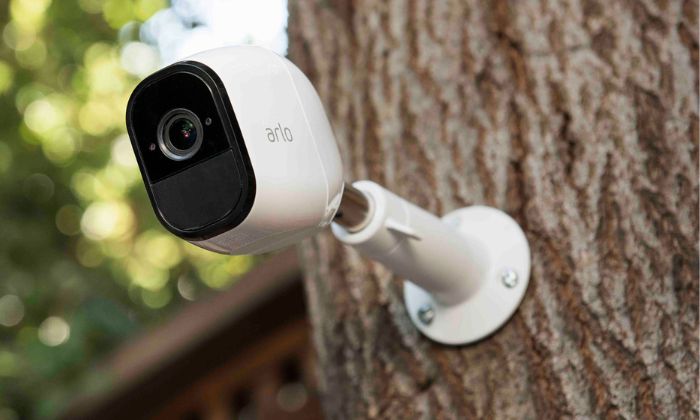
Wireless security cameras are surveillance devices that transmit video and audio data wirelessly instead of relying on traditional wired connections for communication.wireless cameras require a power source unless they can operate entirely on rechargeable batteries or solar panels.
These cameras contain a real time monitoring and recording and connect to your home’s wifi network or a dedicated wireless receiver. They are also suitable for homes, garages, schools and businesses if installed indoors or outdoors.
How Do Wire Free Security Cameras Work
Understanding how wire free security cameras work is important before making a purchase as mostly people confuse wireless cameras with wire free cameras.
Using rechargeable batteries or solar powered batteries wire free security cameras operate. These cameras conserve battery life by remaining in standby mode until motion is detected instead of receiving the continuous electrical power.
So when the movement occurs:
- Motion sensors activate the camera.
- The camera records video.
- Footage is stored locally or uploaded to cloud storage.
- Instant notifications are sent to your smartphone.
This smart operation ensures that important events are captured and helps in extending the battery life also.
Another reason behind asking this question is how wire free security cameras work is because these systems offer flexible placement. They can also be installed anywhere around the property as there is no need for any electrical wiring.
Main Components of Wireless Security Cameras
In wireless security systems there are several components that work together.
Camera Lens
This lens captures the images and determines the viewing angle. A large area is covered by the wide angle lens as the zoom lens focuses on providing detailed close up footage.
Image Sensor
Through this sensor light is converted into digital video. During both day and night high quality sensors produce clearer images.
Wi-Fi Module
For allowing the remote viewing and data transmission the wireless communication chip connects the camera to your internet network.
Motion Detection Sensors
Built-in motion sensors detect movement and trigger recording automatically.
Storage System
The footage is stored:
- On an SD card
- In cloud storage
- On a Network Video Recorder (NVR)
- On local hard drives
How Protect Wireless Security Camera Systems Work
When evaluating modern surveillance solutions many customers also wonder about how wireless security cameras work.
For keeping the footage safe wireless security cameras use multiple layers of protection.
- Encrypted wireless communication
- Password-protected user accounts
- Two-factor authentication
- Secure cloud storage
- Automatic firmware updates
- Remote user permissions
Additionally understanding how wireless security cameras work highlights the importance of strong passwords, secure wifi networks and updating the cameras for maximum protection.
Do Security Cameras Need the Internet?
One of the common misconceptions is that security cameras always require internet access.
So the answer depends upon how you use them.
As some cameras record locally without internet usage.
- SD cards
- DVR systems
- NVR systems
With the internet connectivity there are also some additional features:
- Remote viewing
- Push notifications
- Cloud backup
- Voice assistant integration
- Mobile access
Do Security Cameras Work Without Wi-Fi?
Many buyers also ask this question: even if the internet connection fails do the security cameras work. So yes during the internet outages many cameras continue recording locally. Also until the connectivity returns battery powered cameras with onboard storage remain operational and safe footage until the connectivity returns.
How Do Wireless Surveillance Cameras Work
When comparing the different security systems many homeowners ask how wireless surveillance cameras work. These cameras send the footage wirelessly through the wifi network or another secure connection.
Another advantage of understanding how wireless surveillance cameras work is knowing easily how you can monitor your property. Virtually anywhere with an internet connection through a mobile app you can watch live video, receive motion alerts, review recorded footage.
Cloud Storage vs. Local Storage
One of the most important decisions is selecting the right storage option when choosing a wireless security camera.
Cloud Storage
Cloud storage allows you to access video anytime from any location by uploading recorded footage to secure online servers. If the camera is damaged or stolen it also protects recording. Some providers require a monthly subscription for the additional features and longer video history while some offer free storage.
Local Storage
Local storage saves recording to SD card, NVR or an external hard drive. This option provides quick access to footage and eliminates monthly subscription fees. The recorded videos may be lost unless they have been backed up if the storage device is damaged or in storage.
Smart Home Integration
As compared to simple recorded videos today’s wireless security cameras do much more. It also allows users to create a more connected and automated security system as many models integrate seamlessly with smart home devices.
Some of the common features include:
- Voice control with virtual assistants
- Automatic lighting when motion is detected
- Real-time smartphone notifications
- Two-way audio communication
- Scheduled recording
- Remote camera controls
Benefits of Wireless Security Cameras
Over the traditional wired surveillance systems wireless security cameras offer several advantages.
Easy Installation
Installation is very quicker and less invasive as there are less cables involved. Without any major renovation many homeowners set up their systems easily.
Remote Monitoring
From your smartphone view live footage, receive alerts and access recordings no matter where you are.
Flexible Placement
Making them ideal for homes,offices, garages and vacation properties, wireless cameras can be installed in locations where running cables would be difficult.
Why Choose Cam Security Surveillance?
Choosing the right security partner is just as important as selecting the right equipment. At Cam Security Surveillance, we provide expert security camera installation Indianapolis services with advanced wireless solutions that deliver crystal-clear video, intelligent motion detection, secure storage, and reliable protection for both homes and businesses.
According to your specific security requirements whether you need a single wireless camera or a complete surveillance system our experienced team helps you to find the ideal solution. Cam security surveillance protects what matters most and is effective.
Conclusion
When investing in modern surveillance technology, understanding how wireless security cameras work helps you in making an informed decision. For providing reliable services for home and businesses like these systems combine wireless connectivity, high definition video and smart motion detection.
Wifi enabled surveillance, complete security system wireless technology offers convenience, flexibility and dependable protection whether you are interested in battery powered cameras.
Knowing your property is protected with advanced, user-friendly security solutions gives you greater peace of mind. By choosing Cam Security Surveillance, you can rely on trusted professionals to safeguard your home or business with dependable security camera systems. Contact us today to discuss your security needs and let our team recommend the right solution for your property.
FAQS
How do wireless security cameras receive power?
Some wireless cameras plug into a power outlet, while others operate using rechargeable batteries or solar panels.
Can wireless security cameras record without the internet?
Yes. When the internet is unavailable many wireless cameras can record to SB cards or NVR. However, internet connection is required by remote viewing and cloud storage.
How far can wireless security cameras transmit video?
On factors like wifi signals, obstacles and camera model transmission distance depends. Most of the cameras work within the normal range of a strong home wifi network.










