

Motion detectors sense changes in an area. Use those changes to start an action. The type of change they notice depends on the device. Some pick up shifts in heat others look for reflected signals, sound waves or differences, in an image. When movement matches what the sensor is set to detect it can turn on lights send an alert or start a camera recording.
Understanding how motion detectors work helps you choose the right device for your home or business. Different sensors suit different areas, and proper placement helps reduce false alerts. Cam Security Surveillance explains the main types of motion detectors, how they work with security cameras, and how to improve their performance.
What Is a Motion Detector?
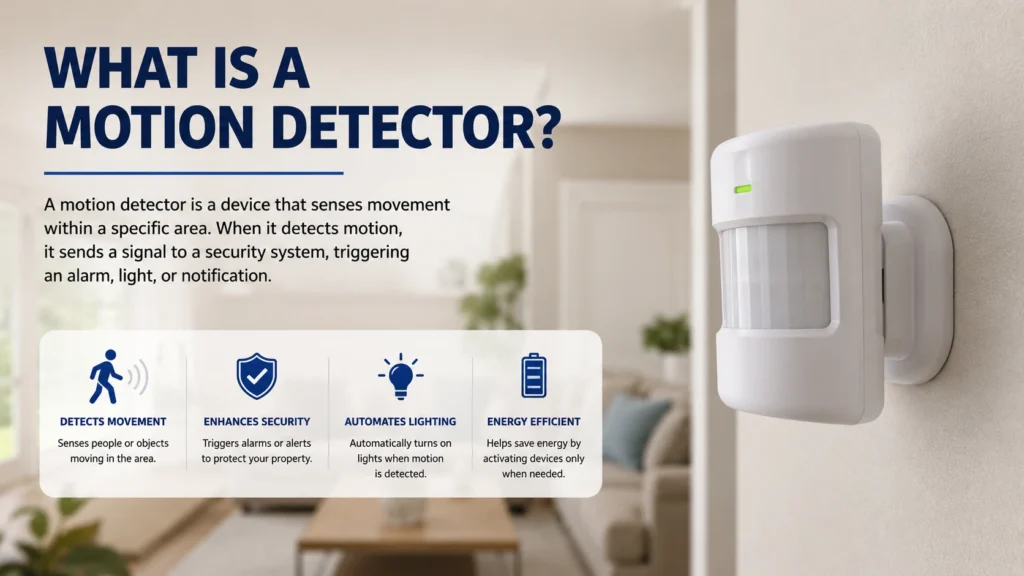
I find a motion detector to be a device that senses movement in an area. It can work alone. Link to lights, cameras and other security devices. If you want to define a motion sensor think of it as a device that measures changes in its surroundings. I know that the terms motion detector and motion sensor often mean the thing.
The main function of motion detector technology is to spot movement. Trigger a response. For example a sensor, near my door can turn on a light when someone approaches.
How Do Motion Detectors Work?
To understand how Motion Detectors work you must first know what the sensor measures. Some Motion Detectors detect changes, in heat. Others use radio waves, sound or video images.
Most systems follow three basic steps:
- Monitor an area: The sensor keeps checking its surroundings.
- Detect a change: It senses a change that matches its detection rules.
- Trigger a response: It sends a signal to a connected device.
For example a motion detector, near a garage can detect a person entering its detection zone. The motion detector may then turn on a light. Instruct a connected camera to begin recording.
The exact response of the motion detector depends on the device the settings of the motion detector and the equipment connected to the motion detector.
Types of Motion Detectors and How They Work
Many sensors use methods to detect movement. Choosing the sensor depends on the location and the task that you need to perform.
Passive Infrared (PIR) Motion Detectors
Passive infrared sensors pick up changes in heat that come from things like people. They don’t send out any signals to look for movement.
When someone walks through the area the sensor is watching the shift in heat can set off a warning. These sensors are often used in home security systems and, in lights that turn on by themselves.
Microwave Motion Detectors
Microwave sensors send out radio waves. Check the signals that come back. Any movement can change the signal that bounces back which lets the device know something is moving.
These sensors work well in areas but walls and other movements nearby can make it harder to detect properly. Putting them in the place helps make the area they watch more accurate.
Dual-Technology Motion Detectors
Dual-technology sensors use two detection methods, PIR and microwave. These sensors need both methods to detect motion before they send an alert. This helps cut down on alarms in the right environments. Still how well they work depends on where they’re placed how they are set up and the conditions, around them.
Ultrasonic Motion Detectors
Ultrasonic sensors send out high-frequency sound waves. Measure their reflections. Movement can change the returning sound pattern. Ultrasonic sensors are often used for tasks, such as automatic lighting. Ultrasonic sensors are less common, in home security systems.
Camera-Based Motion Detection
Security cameras can spot movement by looking at video frames one after another. Some cameras have detection that can recognize people or vehicles. Basic motion detection might pick up any change in the picture like a flicker or a shadow.. Smart detection can help avoid false alerts, such as, from wind moving leaves or a car going by. The effectiveness depends on the camera model.
What Happens When a Motion Detector Detects Movement?
Once a sensor detects a change it sends a signal to a device or control unit. The system then performs the action that the user has set.
For example a shop’s sensor may turn on lights after closing hours. A home security camera may start recording when someone enters the driveway.
Some systems send phone alerts while others activate a siren or notify a monitoring service. A detector does not always contact emergency services by itself. That depends on the security system and its setup.
How Motion Detectors Work With Security Cameras
You might find that motion detection helps security cameras focus on activity of recording every moment. If you turn on motion detection the camera will start recording after the camera sees movement. Motion detection can make important events easier to find. Can save storage space.
However motion-triggered recording can miss events if the sensor does not detect movement or if the camera starts recording late. Continuous recording may be better, for areas that need coverage. Check your cameras recording options and test motion alerts before relying on motion alerts.
Where Should You Install Motion Detectors?
Put detectors in places where movement matters so the sensor can do its job properly. Typical spots are:
- Near front and back doors
- In hallways and entry areas
- Around garages and driveways
- In offices, shops, and storage rooms
- Near access points that need monitoring
Do not put sensors in spots where curtains, tree branches or busy roads move because those movements can set off alerts. Follow the manufacturer’s guidance, for how high to mount sensors. How far sensors can detect.
What Can Trigger a Motion Detector by Mistake?
False alerts happen when a sensor detects activity that does not matter to you. I have noticed that the cause of alerts depends on the type of detector.
PIR sensors may react to heat changes. Moving plants, pets or sunlight can also affect some setups. Microwave sensors may detect movement beyond the area you intended to monitor.
Camera-based sensors can react to shadows, headlights, rain or moving objects. Adjust the sensitivity of the camera sensor. Set detection zones where that is supported. Test the sensor after each change to see whether the number of alerts falls
What Is the Difference Between Motion Detectors and Motion Sensors in Security Cameras?
The terms usually describe the basic purpose: sensing movement. However a separate motion detector and a camera’s built‑in detection feature may work differently. A standalone detector senses. Sends a signal to another device. A camera‑based feature analyzes changes, in the video feed. Some systems use both methods to improve coverage or trigger actions.
How to Improve Motion Detector Performance
Good placement and careful setup help your detector work as intended. Keep these tips in mind:
- Choose a sensor designed for the area.
- Follow the recommended mounting height and range.
- Adjust sensitivity and detection zones when available.
- Use pet-aware settings if your device supports them.
- Keep sensor covers and camera lenses clean.
- Test alerts during day and night conditions.
For camera systems that have many wrong alarms or that miss things happening a specialist can look at where the cameras are placed how they’re set up and if all the connections are working. If you want security camera installation, in Indianapolis Cam Security Surveillance can assist with planning where the cameras should go and testing the system.
Do Motion Detectors Work in the Dark?
Yes many motion detectors work in darkness. PIR sensors detect changes in energy while microwave sensors use radio waves. Neither needs light to sense movement.
Camera-based motion detection depends on the cameras features and available image detail. Models, with infrared night vision can detect activity in light but image quality and detection range still matter.
Conclusion
Understanding how motion detectors work helps you pick the sensor for your space and security needs. Each kind uses a method so where you place it and how you set it up really matters.
After installing the system, test it to make sure everything works correctly. Adjust the settings if you receive false alerts. For camera systems, check that detected motion triggers recording or sends the right notification. Cam Security Surveillance can help you plan a security camera setup for your home or business. Contact us today to discuss your security needs.
Frequently Asked Questions
Do motion detectors detect people or just movement?
Motion detectors in simple form only notice movement or changes, around them. Some modern cameras can also spot people or cars. Only if they have that feature.
Do motion detectors need Wi‑Fi?
No. Many motion detectors do not need Wi‑Fi to work. A network may be useful if you want phone alerts or to control the device from away.
How far can a motion detector detect movement?
The distance a motion detector can see depends on the model, its technology and how it is installed. Read the product details. Test the area after you set it up.
Can pets trigger motion detectors?
Yes. Pets can set off some motion detectors. Settings that are pet‑friendly and placement can lower false alarms but it still depends on the device.
Can motion detectors work through walls?
Some microwave‑based sensors may see movement through non‑metal walls. PIR sensors normally need a view of the area they watch. Always read the maker’s instructions.










