
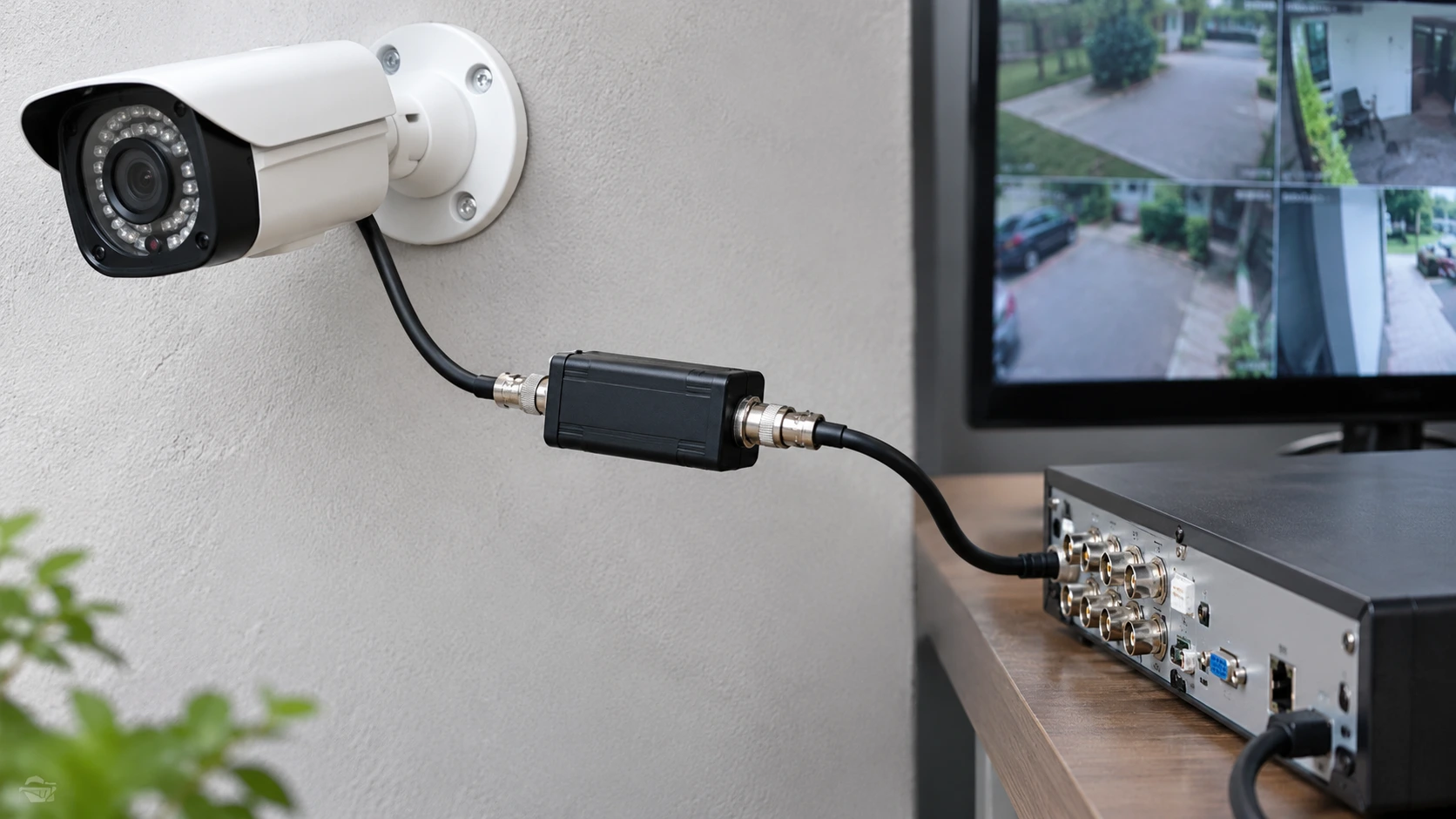
Have you observed those irritating rolling or flickering lines on your CCTV recording? Well, you might be just as irritated by those lines as well as still left asking yourself if your shop, workplace, industrial park, or maybe your property is actually risk-free. Top-quality CCTV setups, for some reason, can still generate breaks in the audio-visual monitors. What’s the deal with it?
Here’s the deal: it could be an electrical ground loop. Those play havoc with your video and generate the sort of voltage that causes the horizontal lines.
Why do you need a ground loop isolator? Simply put, it helps reduce electrical interference between connected devices in your CCTV system. It separates unwanted electrical differences in the video signal while allowing the video feed to pass through. Understanding how to install it correctly can help maintain clear footage and reliable camera performance. Cam Security Surveillance provides professional security camera installation solutions to help keep your surveillance system working properly.
What Is a Ground Loop in a CCTV System?
Have you ever experienced your CCTV detecting rolls or flickering lines? It’s enough to give you a headache, isn’t it? You should be able to enjoy peace of mind at your office, shop, industrial premises, or house, but nothing ever seems to work perfectly!
So, where is this headache coming from? Well, here’s the thing: this can be an electrical ground loop. These are absolutely cruel in your video, as they produce the voltage that causes the horizontal lines.
Why is it that you need to have a ground loop isolator? Well, that boils down to reducing the electrical interference that exists between the two devices. The isolator effectively isolates the electrical aspect of the video and passes the video alone through, so you need to know how to fit it. This will undoubtedly improve the performance of the CCTV.
Why Do CCTV Cameras Need a Ground Loop Isolator?
Have you noticed that your CCTV videos have noise? Maybe you need a ground loop isolator. If your CCTV gear has different ground currents or paths, then this is the solution you need. Suppose you have a camera feeding a DVR that has different grounds on the video outputs and inputs; we’re pretty sure this will cause noise.
Here’s the gist of how it works: In an analogue CCTV installation, the ground loop isolator is just a transformer that is used to create a magnetic barrier within the video signal. This magical device breaks the conduction path of the ground loop without disrupting the video signal you want. That means those annoying ground loop problems should be gone.
Now, if you’ve been experiencing an interference problem since you installed a new CCTV camera, changed power supplies, or extended an RG6 coax, a CCTV ground loop isolator might be just what you need. But, and this is important, a ground loop isolator won’t resolve every image problem. Do you know what really caused the interference in the first place? Make sure you do before you put a ground loop isolator on your CCTV.
Common Signs of Ground Loop Interference in Security Cameras
Ever experienced that jerky ‘horizontal line’ or flickering images on your analog CCTV system? The funny thing is, being able to detect potential ground loop issues can save you from buying new equipment that doesn’t need it. You’ve seen the lines, rolling bars, or irregular distortion start to appear overlaid with electrical spikes on the other monitors or appliances in the room. The power supply is the one running the camera, monitor, or DVR.
You may have an equipment, ground, or power supply problem if you observe interference on multiple cameras. So how do you identify this? By eliminating video cables, power supplies, and ground problems, you can identify this cause without replacing your monitor. Have you done this today?
1. Horizontal lines or rolling bars
Just seen these pesky, horizontal lines crawling across your display? It could be ground loop interference. If the connected equipment is on a different circuit, this can make things even worse!
2. Flickering or jittery images
Are you seeing flickering or jittery images? Is the brightness changing? This could be caused by interference, an unstable power supply, or a bad connection. Determine whether this problem is only happening on one camera or several.
3. Noise caused by interference
If there is interference coming from background machinery, lighting, or electrical gear, it just might be an issue of electrical compatibility. Is it a ground loop, electromagnetic interference, or is there just crap power?
How Does a CCTV Ground Loop Isolator Work?
Interested in how to make sure your video signals stay clear of interference? Look no further! Conventional video isolators work by using a transformer. As your video signal transmits, it causes a varying magnetic field in the video signal’s primary coil, allowing the signal to transfer across to the secondary coil without any contact between the two, interfering with the flow of current through the ground of your video signal.
The use of an isolator helps eliminate interference by isolating important circuitry. However, it can be affected by bandwidth, socket types, impedance matching, and CCTV signal format. If these details aren’t attended to, it’s a head-scratching time when your pictures come in blurry, signals are lost, and more.
Main Benefits of Using a Ground Loop Isolator
Is your existing CCTV system displaying substandard video? A bad ground loop could be the problem, but an isolator is often the perfect fix. An isolator will give your security team and property owners the ability to see more, allowing for easier detection of movement, recognition of important visuals, and playback of footage free of those pesky lines and bars.
Have an analog setup? No problem! An isolator is the quick and easy fix. If your camera or DVR is functional, a technician can just connect the isolator to the video feed and save you the time and cost of changing equipment or doing some technical digging.
But here’s the thing: don’t expect it to cure all issues. Isolators won’t fix broken coaxial cables, damaged power adaptors, or loose BNC connectors. They can’t do anything about earth bonding or safety either. So, do you want to improve the reliability of your CCTV?
How to Fix CCTV Ground Loop Issues
Is everything tight? Recheck! Confirm your kit is powered from a suitable power supply and check the ratings. If possible, have a professional test the setup with good-quality test equipment and cables. Whatever you do, don’t touch anything to do with earthing or mains wiring!
And that’s all you need to do to solve ground loop problems: just plug the isolator into the defective connection. Watch the live picture and recordings afterwards, particularly after dark (we all want to see in the dark!) when you need to be using your infrared cameras. Can’t seem to fix it? Then we suggest you check other electrical/signal quality elements.
Where Should a Ground Loop Isolator Be Installed?
Ever been the ‘video guy’ that everyone calls on when there is a problem with their video? We’ve all been there. Here are some quick tips for troubleshooting video signal issues with your security system. One of the first things you want to look for is a ground loop isolator; this is where you would place a ground loop isolator in the analog video signal path from the camera to your digital video recorder (or at any point near where you would record to a computer where you can make a better connection with the video cable).
Multiple cameras? You may require an isolator for every video channel that is experiencing an issue, but if you have this many, how does that work? Well, the thing is, every cable may be earthed (grounded) differently, so isolating one video channel will not resolve issues on another. Have you tested each video channel to see if that is the channel you need to isolate?
Ground Loop Isolators vs. Other CCTV Interference Solutions
Having some issues with your images and don’t know where to begin? You may need to break the ground loop, change a defective cable, or replace a dead power supply. The thing is, if you don’t correct the problem, your efforts will be in vain. So what can you do now?
| Problem | Possible solution |
| Rolling bars caused by a confirmed ground loop | Install a compatible video isolator. |
| Loose or corroded connectors | Clean or replace connectors as appropriate. |
| Damaged or poor-quality coaxial cable | Replace with a suitable cable. |
| Unstable camera voltage | Check and repair the power supply or distribution. |
| Interference from nearby electrical equipment | Review cable routing and separation. |
| Network camera connection problems | Check Ethernet cabling, switches, network settings, and power over Ethernet. |
Why isn’t your networking-based CCTV working as it should? Are you having problems with a dead resolution, or can the video image tell a source from a destination? It might just be your Ethernet cable, switch, PoE equipment, and earthing that’s not up to scratch. A legacy coaxial video isolator won’t work with Ethernet. Do you have the right kit for the right standard?
How to Choose the Right Ground Loop Isolator
Question: Is your video signal good enough? Yes, you do! Make sure it’s the right kind of HD (high definition) over coax, standard analog, or networked. Make sure the isolator is also the right kind of signal type and frequency/resolution to ensure the quality of that video signal.
Pay attention to cable connections, impedance, and the installation environment. Most analog CCTV systems use 75-ohm coaxial cables with BNC connectors for reliable video transmission. If your installation is outdoors, use weatherproof enclosures to protect connections from moisture, dust, and other damage. For professional security camera installation Indianapolis, choose a setup that suits your property’s needs.
Conclusion
Fed up with those pesky rolling bars and horizontal lines ruining your analog surveillance? Well, the ground loop isolator might be your new BFF! They deal with noise by breaking the stray currents on transfer. How about that?!
Once you’ve identified the source of the problem and are ready to install a new component, choose an isolator that suits your camera and recording system. Always prioritize installation safety to protect your surveillance equipment. Remember, electrical isolation and grounding serve different purposes, so don’t confuse the two.
For professional security camera installation and troubleshooting, contact us today. Our team can help you find the right solution for your surveillance system.
FAQs
What’s the Main Purpose of a CCTV Ground Loop Isolator?
Its primary role is to reduce the risk of video interference created by backflow of stray current from one piece of equipment to another along a common signal-ground return. This is primarily found in compatible analog CCTV systems.
Must Every CCTV Camera Use a Ground Loop Isolator?
Not necessarily. All of the systems work without one if they are installed properly, unless you encounter ground loop problems. Therefore, if your system has a proper installation, the addition of an isolator may not be necessary and may just add to your costs and complexity.
Will A Ground Loop Isolator Remove Horizontal Lines?
Absolutely, if the culprit lines are caused by a ground loop and the isolator is compatible with your system. However, if the noise lines are caused by a bad cable, power supply, or other source, those lines may stay.
Can a Ground Loop Damage a CCTV Camera?
A ground loop typically only results in noise or signal interference. More drastic ground-potential differences may be indicative of larger electrical problems. The smart money: Let a technician diagnose whatever voltage there may be instead of ignoring it with an isolator.










