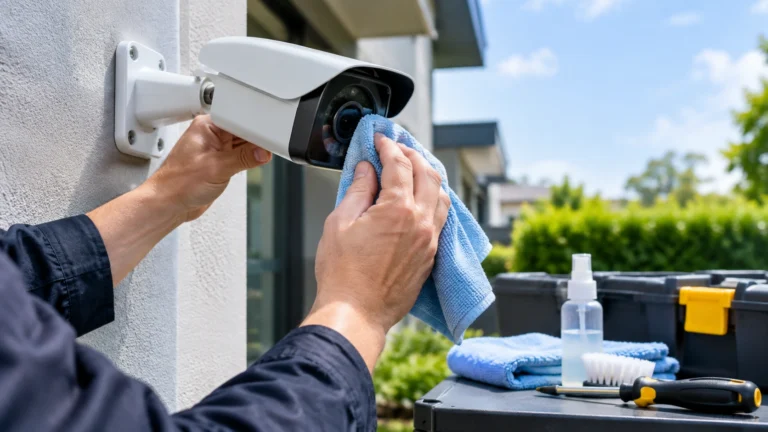
How to clean and maintain your cameras for maximum performance. Dust, dirt, rain droplets, insects, loose connections, and weather conditions can all affect a camera’s performance and image quality over time.
Keeping your CCTV camera maintained doesn’t have to be difficult — ensuring your cameras are regularly checked, the lens is cleaned, the cables are intact, recordings are being captured, and the system software is up to date can help prevent small problems from turning into serious security issues.
Why Is CCTV System Maintenance Important?
Your CCTV system is there to keep you safe when you need it most, but if left unchecked it can develop issues. Dirty camera lenses can give blurry footage, and cables and connections can get damaged or loose, leading to gaps in your footage. At Axis, we recommend regular maintenance to help stop dirt, dust, and the elements from affecting your recorded footage.
Regular checks will:
- Help keep your camera footage clean and clear
- Ensure your system is recording
- Help prevent damage to equipment and cables
- Confirm cameras are still recording
- Maintain correct angles for cameras
- Identify faults and damaged equipment
- Keep firmware up to date
How Often Should You Maintain a CCTV System?
There isn’t one set answer to this, as it varies depending on the property the system is installed in.
Indoor cameras in a clean environment may need less regular physical cleaning, as opposed to outdoor cameras exposed to dust, rain, pollen, insects, and pollution.
Axis recommends conducting periodic maintenance at least every six months, with more regular checks depending on the installation.
A simple routine can include:
| Maintenance Task | Suggested Frequency |
| Check camera views | Weekly |
| Check recording status | Weekly |
| Clean visible dirt from cameras | As needed |
| Inspect cables and connections | Monthly |
| Check camera housing | Monthly |
| Check firmware/software | Monthly or when updates are available |
| Full system inspection | At least every 6 months |
These are practical guidelines rather than a replacement for the maintenance instructions supplied with your specific camera.
How to Clean Security Cameras
Here is the recommended process for maintaining your camera’s image quality, based on common camera manufacturer instructions. Remember to never scratch the lens or use strong chemicals.
Step 1: Turn Off Power When Appropriate
Examine the camera before you start cleaning and power off or disconnect it depending on the directions of your camera producer.
Step 2: Remove Loose Dust
Air is the best tool to clean dust off a camera lens. Don’t rub a dusty lens with a dry cloth first, because particles might scratch the protective surface.
Step 3: Use a Soft Microfiber Cloth
Wipe the lens and camera body using a clean, soft microfiber cloth. Microfiber or other soft, non-abrasive materials are recommended by Axis.
Step 4: Use an Appropriate Cleaning Solution
If acceptable by the manufacturer, use an adequate cleaning solution approved for your camera. Depending on the producer’s requirements, this can range from a mild, non-abrasive solution to no cleaning solution at all.
Refer to your camera’s manual to see if a cleaning solution can be applied to the lens.
Step 5: Dry the Surface
After cleaning, gently dry the surface using a clean, non-abrasive cloth to prevent water spots.
Avoid cleaning outdoor cameras in direct sunlight or extreme heat when the manufacturer warns against it, as this can cause staining.
Security Camera Cleaning Tips for Clearer Footage
These camera cleaning tips will help you avoid causing any damage while cleaning:
- Use a microfiber cloth
- Remove dust with a blow duster or brush first, then use cleaner only on the lens
- Do not scrub the lens, as this can scratch it
- Never use abrasive materials on a camera lens
- Do not clean with window cleaner unless approved by the camera manufacturer
- Never use acetone, gasoline, or other harsh chemicals
- Spray the cleaning solution onto the cloth rather than the camera lens, unless approved by the manufacturer
How to Maintain Outdoor CCTV Cameras
Cameras located outdoors require more maintenance than indoor CCTV cameras due to exposure to the elements.
Dust and Dirt
Dust on the lens or camera housing is common in dry, dusty, or high-traffic areas.
Rain Spots
Dried rain droplets can leave marks on the cover and affect image quality.
Spider Webs and Insects
Spider webs or bug carcasses near the lens can obscure the view and cause false triggers or glare at night.
Moisture or Condensation
Inspect the housing for evidence of water entry or condensation, and be aware that a compromised seal or cracked housing may need professional attention.
Rust and Corrosion
Examine any exposed brackets, screws, and connectors for rust and corrosion, particularly in less than ideal conditions.
Check Your Camera’s Position and Viewing Angle
Cleaning is only one aspect of maintaining a CCTV system. Even if a camera appears pristine, if it has been knocked out of position it won’t produce great footage.
Check the live view of each camera and ask yourself:
- Is the entrance still visible?
- Has the camera been dislodged?
- Is there any obstruction to the view?
- Has landscaping grown into the camera’s line of sight?
- Is the camera pointing too high or too low?
- Are there any blind spots?
It’s also worth regularly monitoring each camera’s position as part of a planned CCTV maintenance program.
Check Your CCTV Recording System
Don’t just trust that a camera is recording because its power light is on.
Sign into your recorder or video management software and verify that:
- All of the cameras are turned on
- Recordings are being saved
- Your timeline has no unexpected breaks
- Storage is running correctly
- Motion detection is functioning, if enabled
- Date and time are set correctly
An often overlooked problem is a camera that has been down for weeks and is only noticed when you actually need the footage.
Inspect CCTV Cables and Connections
Regularly check any viewable wiring and connections if you have a wired CCTV setup.
Watch for:
- Connections that don’t fit properly
- Insulation damage or slitting on wiring
- Wear, tear, and fraying
- Exposure to water
- Signs of corrosion
- Broken or bent cabling
Don’t forget outdoor runs of cable. We often focus CCTV maintenance on the device itself, but exterior cable runs are also affected by the weather over time.
If you discover damaged electrical or network wiring, don’t attempt a repair unless you know how to do so safely.
Keep CCTV Firmware and Software Updated
Physical cleaning is only one aspect of maintaining a modern surveillance setup.
Firmware and software updates from the camera manufacturer can patch bugs and close security holes. Sometimes these updates aren’t compatible with your current camera setup and recording platform, so always research thoroughly before applying them.
What to Do If Your CCTV Footage Is Blurry
If a camera suddenly produces blurry footage, start with the simplest possible causes.
First, Check the Lens
Dust, fingerprints, water spots, or other debris may be affecting the image.
Check for Condensation
Moisture inside the camera housing can cause a cloudy or hazy image and may indicate a problem with the enclosure or seal.
Check the Focus
Some cameras allow you to adjust a focus ring or screw.
Consult the manufacturer’s instructions if cleaning hasn’t helped and you don’t see any focus adjustment features.
Check the Camera
If cleaning and focus adjustments don’t improve picture quality, the camera itself may have a technical issue that a professional service technician will need to address.
Common CCTV Maintenance Mistakes
Using Harsh Chemicals
Strong chemicals can damage camera covers, lenses, and other surfaces.
Scrubbing the Lens
Harsh rubbing will scratch the surface and permanently reduce image quality.
Cleaning With a Dirty Cloth
Using a dust-laden cloth will cause scratches.
Ignoring the Recorder
Even a clean camera won’t help if the recorder isn’t working.
Forgetting Outdoor Cameras
Outdoor cameras accumulate far more dirt and water-related contamination than indoor cameras.
Waiting Until There Is a Problem
Waiting until something goes wrong to check your cameras makes troubleshooting far more difficult than routine checks would.
Simple CCTV Maintenance Checklist
- Real-time view of each camera
- Clean dirty lenses and covers
- Remove spider webs and other debris
- Check camera angles and placement
- Confirm all cameras are recording and working
- Inspect cables and connectors within reach for breaks or cracks
- Check outdoor housing for spider webs, moisture, and corrosion
- Confirm available storage
- Verify date and time are set accurately
- Check that firmware/software is up to date
- Regularly test key camera views
When Should You Call a Professional?
There are routine maintenance activities that property owners and managers can perform themselves, and others such as technical issues that require a specialist.
Contact a professional if:
- A camera repeatedly disconnects
- A camera no longer captures video
- The wiring is torn or broken
- Water is inside the housing
- A camera looks blurry even after cleaning
- Several cameras go out of service at the same time
- Repositioning the system is necessary due to DVR/NVR recording or storage issues
- You want additional cameras installed
A technician can perform a full-system review rather than simply looking at one problem and if you’re in the area and searching for security camera installation indianapolis, a professional installer can also help design your system from the ground up.
Final Thoughts
Maintaining and cleaning your CCTV system boils down to having a simple routine rather than waiting for something to fail: clean the lenses and housings, monitor camera positioning, examine the cables, test the recordings, and pay extra attention to outdoor equipment exposed to the elements. Regular CCTV camera maintenance will go a long way toward ensuring your system continues to function correctly and that your footage is available when you need it.
If you require assistance with installing, inspecting, troubleshooting, or regularly maintaining your CCTV system including security camera installation indianapolis Cam Security Surveillance is here to ensure your security system operates at maximum efficiency. Contact us today to schedule a maintenance check or a new installation.
Frequently Asked Questions
How often should CCTV cameras be cleaned?
Clean your cameras as soon as mud, dust, rain, or water spots begin to obscure the lens or housing. Because outdoor cameras face harsher conditions, cleaning them regularly becomes especially important.
What is the best way to clean a CCTV camera lens?
Remove any loose dust first, then gently wipe the lens with a soft microfiber cloth, using only a cleaning solution approved by the manufacturer. Avoid abrasive materials or solutions.
Can I use glass cleaner on my security camera?
Not necessarily — some manufacturers explicitly warn against certain glass cleaners and harsh agents. Check the manufacturer’s materials list before using any cleaning solution.
Why does my CCTV camera look blurry after rain?
Water spots, moisture, dirt, or condensation can affect image quality. Clean the exterior carefully and check whether moisture has entered the housing. Persistent condensation may indicate a problem with the camera enclosure or seal.
What should CCTV system maintenance include?
CCTV maintenance should include verifying camera views, cleaning lenses and housings, checking cables and connections, confirming recordings, monitoring storage, verifying camera orientation, and updating firmware and software.
How can I keep my outdoor security cameras working properly?
Perform regular inspections of the camera exterior, clean off dirt and spider webs, examine the lens, check for water infiltration and rust, and confirm the camera is still positioned correctly.